
Styler for Revit®
$0.00
Compatible con Revit 2027, 2026, 2025, 2024, 2023 y 2022
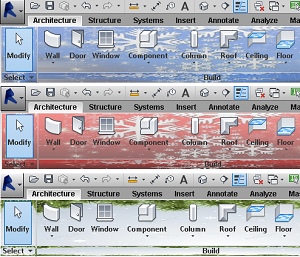
Styler is an add-in created to improve the user’s experience with Autodesk® Revit®, by allowing the user to customize the Ribbon and Panels with a solid color, two colors, or any image.
Also, it allows the user to select any Font Style and Size for the text of the Ribbon and Panels.
The add-in will automatically start every time the user opens Revit and it will set the customization selected by the user.
It is very easy to change styles of colors and texts without restarting Revit. You can save your own customizations for later use.
The images used by the app are stored in «My Images/StylerImages».
General Usage Instructions
Use the installer to add a ribbon named STYLER® Use the button STYLER to load the add-in.The Form is divided by:
- Templates
- Background Options
- Text Font Options
- Preview of Text
Templates: Some templates of colors, images, and text are included with the add-in. You can save your own templates no matter how many.
Background Options: Here you can select to use colors or an image for the background of the Ribbon and Panels. Also, you can set the opacity.
Text Font Options: Here you can customize the Font Type, Size, Font Style, and Font Width of the Ribbon and Panels.
Preview of Text: Here you can Preview the result of the Text Font Options customization.
By clicking OK on the FORM all the customizations will be applied to Revit. No re-start is needed.
In Stock
| Software | |
|---|---|
| Garantía | Todos nuestros add-ins cuentan con soporte técnico para su correcta puesta en marcha. En caso de presentarse algún inconveniente de instalación o funcionamiento, se dispone de un plazo de hasta 72 horas hábiles desde la fecha de compra para diagnosticar y resolver el problema. |
1 valoración en Styler for Revit®
You may also like…
-
 Este producto tiene múltiples variantes. Las opciones se pueden elegir en la página de producto
Sistema de Encofrados (Formwork)
Rango de precios: desde $195.00 hasta $500.00 -
 Este producto tiene múltiples variantes. Las opciones se pueden elegir en la página de producto
Tarrajeo-Revoques (Plastering)
Rango de precios: desde $95.00 hasta $250.00
Related products
-

Panorama 360
$20.00 -

ID Stamper
$15.00 -

Briefcase
$25.00 -
 Este producto tiene múltiples variantes. Las opciones se pueden elegir en la página de producto
Motion Reader
Rango de precios: desde $30.00 hasta $50.00
Amdghey –
Good